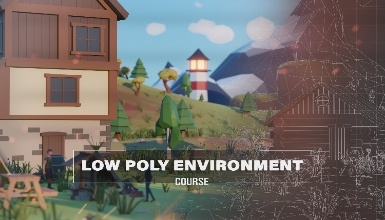
Blender 3D Low Poly Environment Course
Create Amazing Low-Poly Environments and Characters!
 Updated on Oct, 2026
 Language - English
AI Assistant

Lectures -27
Duration -7.5 hours
Lifetime Access

Lifetime Access
30-days Money-Back Guarantee
Get your team access to 10000+ top Tutorials Point courses anytime, anywhere.
Course Description
Welcome to "Blender Low Poly Environment Course" - your entry ticket to mastering low-poly 3D design.
Throughout this course, you will learn as a beginner or intermediate Blender user. Whether you are new to Blender or someone who has been experimenting with it for a while, this course will help you develop your skills and explore the world of low-poly modeling.
Course Highlights:
Modeling
Create a collection of 3D models, from houses and lighthouses to props and trees. Learn the core techniques used to build virtual environments.
Materials and Lighting
Learn how to add texture, colour, and lighting effects to a scene using materials and environmental lighting that make low-poly models look vibrant.
Character Creation and Rigging
Learn how to create low-poly characters and rig them. Whether for game design or animation, this section helps develop skills for animating characters.
Scene Composition
Learn how to compose and organize models in a virtual space to create visually balanced and appealing scenes. Understand the principles behind creating low-poly compositions that tell a story in your 3D environments.
And that’s just the beginning.
Goals
Steps to Complete Your Project
Theme
Choose a theme for your low-poly environment. It could be a beautiful landscape, a cityscape, or something else. Let your imagination flow.
Create Your Scene
Bring your chosen theme to life using the techniques learned in the course by sculpting the terrain, placing objects, and adding your own design style.
Lighting and Atmosphere
Experiment with lighting to create the atmosphere of your scene. It may be a bright sunny morning or a mysterious dark setting. Use shadows and vibrant colour combinations to enhance the effect.
Optional Animation
You can also add animation to your scene, such as wind moving through trees or a sunset on the horizon.
Share Your Masterpiece
Once you have finished your project, here is how you can share it with the community and receive feedback.
Upload to the Class Project Gallery
Go to the Projects and Resources section of the course and upload pictures or videos of your creation. Share your work with other learners and inspire them.
Constructive Feedback
Engage with other students by viewing their projects in the gallery. Share your opinions, ask questions, and offer appreciation.
Connect in the Discussion Board
Post your project ideas in the class discussion board. Share what you learned, the challenges you faced, and the tips you discovered during the process.
We are excited to see the worlds you will build.
Prerequisites
None
Curriculum
Check out the detailed breakdown of what’s inside the course
Blender Low Poly Environment Course
27 Lectures
-
 Introduction
00:42
00:42
Introduction
00:42
00:42
-
Setting Up Your Scene and Project Folder Hierarchy
07:59
07:59
-
Creating Low Poly Rocks - Part 1
14:49
14:49
-
Creating Low Poly Rocks - Part 2
09:14
09:14
-
Creating Low Poly Trees - Part 1
19:41
19:41
-
Creating Low Poly Trees - Part 2
16:48
16:48
-
Creating Low Poly Trees - Part 3
13:01
13:01
-
Creating Low Poly Foliage - Part 1
15:57
15:57
-
Creating Low Poly Foliage - Part 2
23:55
23:55
-
Creating Low Poly Flowers
23:10
23:10
-
Creating Low Poly Underwater Plants
24:47
24:47
-
Creating Low Poly Landscape
11:43
11:43
-
Creating Low Poly Mountains and Cliffs - Part 1
08:47
08:47
-
Creating Low Poly Mountains and Cliffs - Part 2
10:35
10:35
-
Creating Low Poly Water
09:29
09:29
-
Using Geometry Nodes To Populate a 3D Environment
24:59
24:59
-
Creating Low Poly Lighthouse
05:32
05:32
-
Creating Low Poly Buldings - Part 1
19:34
19:34
-
Creating Low Poly Buldings - Part 2
20:48
20:48
-
Creating Low Poly Buldings - Part 3
22:05
22:05
-
Creating Low Poly Props - Part 1
13:53
13:53
-
Creating Low Poly Props - Part 2
23:25
23:25
-
Creating Low Poly Characters - Part 1
22:43
22:43
-
Creating Low Poly Characters - Part 2
27:46
27:46
-
Creating Low Poly Characters - Part 3
18:32
18:32
-
Character Rigging Tutorial
30:17
30:17
-
Final Section of the Course - Finalizing Scene
24:37
24:37
Instructor Details

Eldamar Studio
Eldamar Studio is a creative team dedicated to producing high-quality educational content in the field of digital design and technology. With a passion for teaching and innovation, the studio focuses on creating practical, easy-to-follow courses that help learners build real skills. Their goal is to make complex topics simple and accessible, enabling students of all levels to grow their knowledge and confidence.
Course Certificate
Use your certificate to make a career change or to advance in your current career.
Our students work
with the Best

















Related Video Courses
View MoreAnnual Membership
Become a valued member of Tutorials Point and enjoy unlimited access to our vast library of top-rated Video Courses
Subscribe now
Online Certifications
Master prominent technologies at full length and become a valued certified professional.
Explore Now