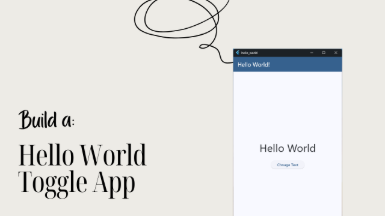
Build a Hello World Toggle App in Flutter
This Hello World project teaches you control, logic, & interaction the true first steps to becoming a Flutter Developer
 Updated on Oct, 2026
 Language - English
AI Assistant

Lectures -6
Duration -19 mins
Lifetime Access

Get your team access to 10000+ top Tutorials Point courses anytime, anywhere.
Course Description
Goals
- Create and structure a new Flutter project
- Use setState() to rebuild widgets dynamically
- Build a clean, minimalist UI with core Flutter widgets
- Handle user interactions (tapping, and updating text)
- Manage simple app logic to switch between two states
- Run and test your app on emulator or real device
Prerequisites
- You don't need any coding experties. This class is for complete beginners.
- All you need is a PC, Flutter Development Development Environment set up, and a decent internet.
- You can get the Flutter Installation guide step by step from here:
- Flutter Installation Guide - Step by Step
Curriculum
Check out the detailed breakdown of what’s inside the course
Build a Hello World Toggle App in Flutter
6 Lectures
-
 What you will learn
00:46
00:46
What you will learn
00:46
00:46
-
The Hello World Project, Main Function & RunApp Function
02:58
02:58
-
Building MyApp, Adding Material Design, Setting HomeScreen
03:21
03:21
-
Creating The HomeScreen (Statefull Widget)
03:33
03:33
-
Building the UI with Material 3 Color Scheme
03:39
03:39
-
Building The Body, Center, Column, Text & Button
05:41
05:41
Instructor Details

Flutter Sensei
Teaching Flutter One App at a TimeCourse Certificate
Use your certificate to make a career change or to advance in your current career.
Our students work
with the Best

















Related Video Courses
View MoreAnnual Membership
Become a valued member of Tutorials Point and enjoy unlimited access to our vast library of top-rated Video Courses
Subscribe now
Online Certifications
Master prominent technologies at full length and become a valued certified professional.
Explore Now